> For the complete documentation index, see [llms.txt](https://docs.bottalk.io/docs/llms.txt). Markdown versions of documentation pages are available by appending `.md` to page URLs; this page is available as [Markdown](https://docs.bottalk.io/docs/text-to-speech/automation-rules/multiple-voice-selection.md).
# Multiple Voice Selection
A feature that lets you select multiple voices and have each article read in a randomly chosen voice from that set.
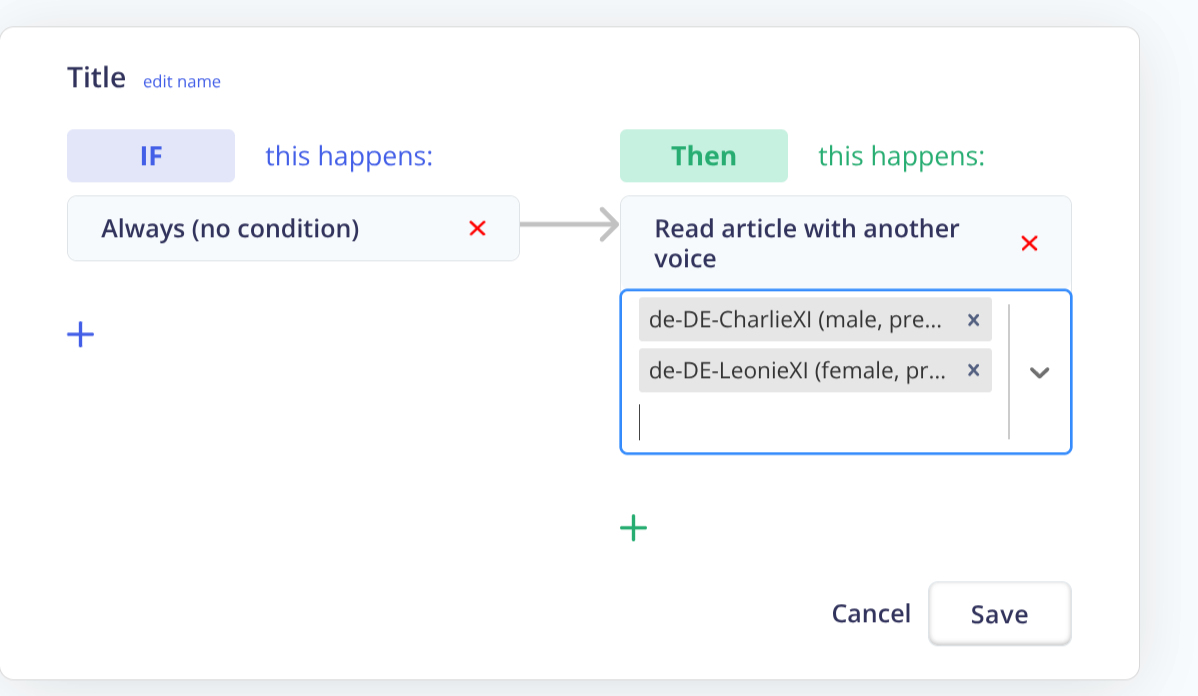
Enable this feature so articles are read with a random voice from the voices you pick:
1. Open Automation Rules\
Go to your dashboard → Automation Rules.
2. Add a Custom Rule\
Click Add Rule (create a Custom Rule).
3. Set the Condition\
Choose Condition: “Always.”
4. Choose the Action\
Add the action “Read in another Voice.”
5. Select Multiple Voices\
In the voice list, select multiple voices you want to rotate through. Save.
### How it works
* **One-time randomization per article:**\
On the article’s first audification, BotTalk randomly picks **one** voice from your selected set for that article.
* **Sticky voice per article:**\
BotTalk **remembers** the chosen voice for that article. If the article text is updated later, it will **stay in the same voice**—no re-randomization—so the listening experience remains consistent.
* **When does randomization happen again?**\
Only if you clear the article’s audio/voice assignment (e.g., by reprocessing after removing the prior selection) or the rule/selection changes in a way that invalidates the stored voice.
{% hint style="info" %}
If only one voice is selected, that single voice is always used (no rotation).
{% endhint %}
* You can update the voice list anytime; changes apply to **new** articles (or to existing ones only after clearing their stored voice).
* Check your rule order to ensure no other rule overrides **Read in another Voice**.